
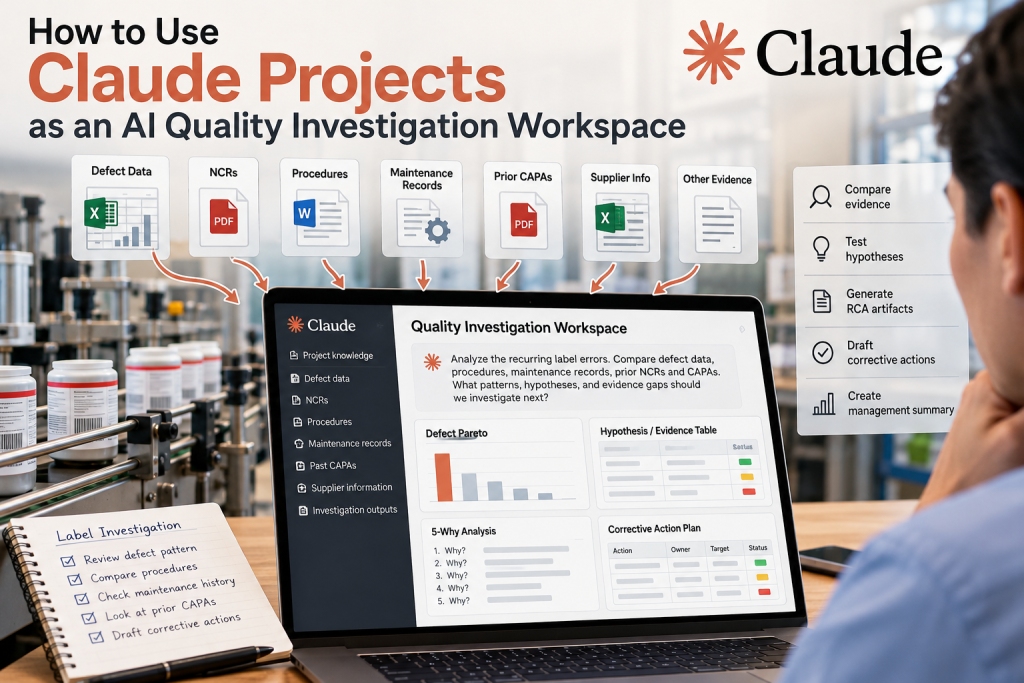
Quality investigations rarely fail because of a lack of data. They fail because the evidence is scattered. A nonconformance may be recorded in one file, the applicable procedure in another, maintenance history elsewhere, prior CAPAs in a separate folder, and relevant process notes buried in email or a shared drive. The quality engineer spends time finding, comparing, organizing, and reconciling information before the real investigation even begins.
Claude Projects can provide a different kind of AI quality-engineering environment. Instead of treating AI as a chatbot that answers one question at a time, you can create a persistent investigation workspace where Claude works across defect data, procedures, NCRs, maintenance records, prior corrective actions, spreadsheets, and other supporting evidence. The result is not simply automated document search. It is a persistent quality investigation workspace where evidence, hypotheses, analysis, and corrective-action reasoning can remain connected throughout the investigation.
Why Claude Projects Are Useful for Quality Investigations
A Claude Project is a persistent workspace with its own knowledge, instructions, and working context. That makes it useful for investigations that unfold over multiple steps rather than a single prompt.
A quality investigation might involve:
- defect logs,
- inspection data,
- NCRs,
- SOPs,
- work instructions,
- equipment records,
- maintenance history,
- prior root-cause investigations,
- CAPAs,
- customer complaints,
- supplier information,
- spreadsheets,
- PDFs,
- Word documents.
Instead of repeatedly uploading the same information or rebuilding context from scratch, those materials can become part of the investigation environment. Anthropic also supports connectors through the Model Context Protocol, or MCP, which can give Claude access to external business systems and data sources rather than requiring every source to be copied into the Project. That makes Claude particularly interesting when a quality investigation spans multiple systems rather than living neatly inside one office suite.
Build a Persistent Quality Investigation Workspace
A practical Claude Project might be organized conceptually like this:
Quality Investigation Project
│
├── Defect and Inspection Data
├── NCRs and Customer Complaints
├── Procedures and Work Instructions
├── Equipment and Maintenance Records
├── Historical RCA and CAPA Records
├── Supplier Information
└── Investigation Outputs
The important point is not the exact folder structure. The point is to give Claude a bounded set of information that represents the investigation.
You can also define Project instructions such as:
- distinguish observations from hypotheses;
- do not invent missing data;
- identify the source supporting each factual conclusion;
- preserve original defect descriptions;
- separate possible causes from verified causes;
- do not treat a corrective action as approved;
- flag contradictions among records.
Those instructions create a persistent reasoning discipline for the investigation.
Bring Mixed Evidence Into One Investigation
Quality problems rarely live in one type of file. Consider a recurring labeling problem. The defect log may show repeated label errors. The work instruction may describe the label setup. The equipment manual may define sensor behavior. Maintenance records may show repeated adjustments to the label applicator. Prior NCRs may reveal that the same failure occurred six months earlier. A CAPA may show that operators were retrained, but no equipment change was made. Individually, none of those records provide the complete picture. The value of the investigation workspace is that Claude can compare them together.
Instead of asking: What causes labeling errors? you can ask: Compare the current defect data, labeling work instruction, maintenance history, previous NCRs, and prior CAPAs. What evidence is consistent across these sources, what conflicts, and what should be investigated next? That is a much more useful quality-engineering question.
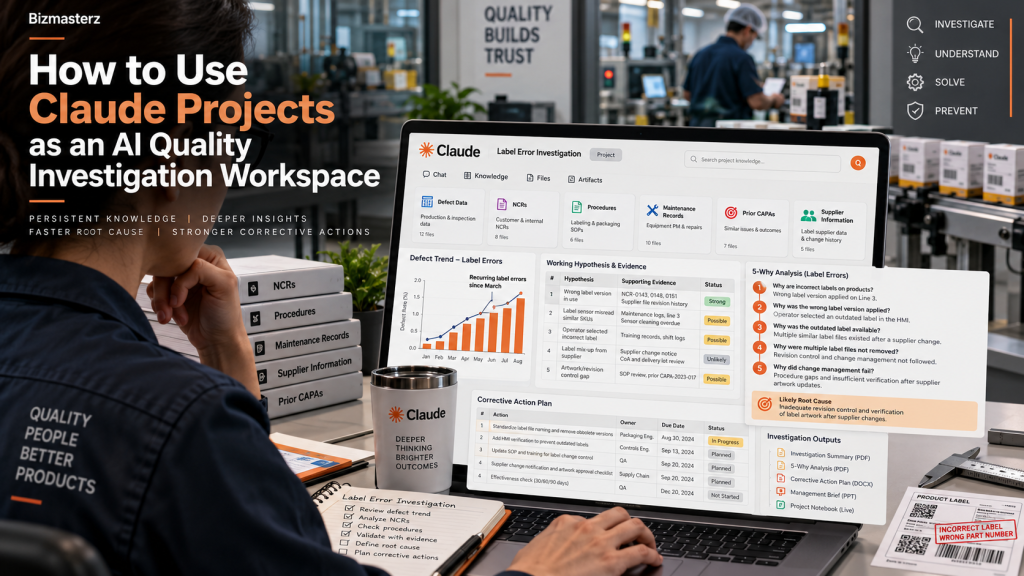 Claude Projects as AI Quality Investigation Workspace
Use Claude to Separate Observations, Hypotheses, and Evidence
One of the biggest risks in AI-assisted root-cause analysis is allowing a plausible explanation to become a conclusion. Claude can generate hypotheses quickly. That is useful, but the investigation should deliberately separate four things:
- OBSERVATION
- HYPOTHESIS
- EVIDENCE
- CONCLUSION
For example:
| Type | Investigation Record |
|---|---|
| Observation | Label position errors increased during second shift |
| Observation | Applicator maintenance occurred three times in the last month |
| Hypothesis | Label sensor alignment may be drifting |
| Evidence Needed | Sensor-position measurements by shift |
| Hypothesis | Operators may be loading label rolls inconsistently |
| Evidence Needed | Setup comparison across operators |
| Conclusion | Not yet established |
This structure prevents AI from jumping from correlation to root cause. Claude’s role is to help organize the investigation and identify missing evidence. The quality professional remains responsible for deciding when the evidence is sufficient.
Work a Recurring Label Error Investigation End-to-End
Suppose a manufacturing operation is experiencing recurring label-position errors.
The defect history shows:
Label Misalignment      96
Missing Label           31
Wrong Label             18
Unreadable Barcode      12
Other                    9
A Pareto analysis shows that label misalignment is the dominant defect. That is where the focused investigation begins.
Step 1: Review the Current Defect Pattern
Claude can examine:
- defect counts by date,
- shift,
- machine,
- product,
- operator,
- label type.
The investigation may discover that most label-position defects occur:
- on Line 3,
- during second shift,
- after product changeovers.
That does not establish root cause. It establishes a pattern worth investigating.
Step 2: Compare the Procedure to Actual Records
Next, Claude can compare the labeling work instruction with:
- setup records,
- maintenance notes,
- NCR descriptions,
- previous corrective actions.
Suppose the work instruction says: Verify label sensor position after each product changeover. But maintenance records show frequent sensor adjustments, while NCRs repeatedly mention label drift after changeover.
That raises a useful investigation question: Can the current sensor-position check detect the condition that leads to label drift? Again, that is a hypothesis—not a conclusion.
Step 3: Build a Working Hypothesis Table
Claude can maintain a live hypothesis/evidence table during the investigation.
For example:
| Potential Cause | Supporting Evidence | Contradicting Evidence | Status |
|---|---|---|---|
| Sensor misalignment after changeover | Defects cluster after changeovers; repeated sensor adjustment in maintenance log | No direct sensor-position measurements yet | Investigate |
| Operator setup variation | Defects concentrated on second shift | Same operators also run defect-free periods | Weak |
| Label-roll variation | Some complaints mention curling labels | Supplier lots do not correlate with defect periods | Low priority |
| PLC timing issue | One maintenance note mentions timing adjustment | No repeat evidence | Open |
This is one of the strongest uses of Claude as an investigation workspace. The AI is not simply producing a 5-Why worksheet once. It is maintaining the state of the investigation as evidence changes.
Step 4: Use 5-Why and Fishbone as Analytical Views
Traditional quality tools still matter. Claude can generate a 5-Why analysis from the working evidence.
For example:
Problem: Labels are positioned incorrectly after changeover.
Why 1: Why are labels misaligned?
The label is applied at the wrong position.
Why 2: Why is the application position wrong?
Sensor reference position varies after setup.
Why 3: Why does the sensor position vary?
The setup check confirms presence but does not verify a measured position.
Why 4: Why is position not measured?
The work instruction uses a visual setup method.
Why 5: Why does the procedure rely on visual setup?
No controlled positional standard was established when the process was developed.
The same investigation can also be viewed through a Fishbone matrix:
| Category | Potential Cause |
|---|---|
| Man | Setup variation by operator |
| Machine | Sensor position drift |
| Material | Label curl or adhesive variation |
| Method | Visual setup standard |
| Measurement | No measured sensor-position check |
| Environment | Temperature or contamination affecting label handling |
These tools organize reasoning. They do not replace evidence.
Compare the Current Problem With Historical CAPAs
One of a persistent project’s most valuable uses is historical comparison. Suppose Claude finds a prior CAPA from eight months earlier. The previous corrective action was: Retrain operators on the labeling setup procedure. But the new investigation finds that the same failure mode has returned.
Claude can compare:
- previous root cause,
- previous corrective action,
- current evidence,
- recurrence.
That may reveal that the original CAPA treated operator behavior while the underlying equipment or measurement condition remained unchanged. This allows the quality engineer to ask: Did the previous CAPA eliminate the cause, or only address the symptom? That is much more valuable than simply generating another 5-Why diagram.
Draft the Corrective Action From the Investigation Record
Once evidence supports the root cause, Claude can turn the investigation into a draft action plan.
For example:
| Action | Owner | Target | Verification |
|---|---|---|---|
| Establish sensor-position specification | Engineering | Nov. 8 | Approved setup specification |
| Add measured sensor-position check | Quality | Nov. 10 | Revised work instruction |
| Add fixed setup reference | Maintenance | Nov. 12 | Repeatability study |
| Retrain affected operators | Production | Nov. 14 | Training completion |
| Monitor label defects | Quality | Dec. 15 | 30-day effectiveness trend |
The advantage is that the corrective-action proposal comes from the investigation record rather than from a fresh prompt disconnected from the evidence. Corrective-action approval should still remain human-controlled.
Generate Analytical Artifacts From the Investigation
Claude can also create useful investigation outputs. Anthropic supports reusable Skills that can help Claude produce spreadsheets, documents, presentations, and other structured files, and organizations can define their own Skills for repeatable workflows.
For a quality investigation, outputs might include:
- Pareto spreadsheet,
- hypothesis/evidence matrix,
- 5-Why worksheet,
- Fishbone matrix,
- corrective-action plan,
- trend chart,
- management summary.
This is where Claude moves beyond conversational analysis. The Project becomes a working environment for producing the artifacts needed to complete the investigation.
Use Connectors When Evidence Lives Outside the Project
A quality investigation often needs information that is not stored in the Project itself.
Examples might include:
- SharePoint documents,
- Google Drive files,
- maintenance systems,
- project-management tools,
- databases,
- collaboration platforms.
Claude supports connectors through MCP, allowing it to work with external data sources and tools rather than relying only on uploaded copies. Anthropic describes connectors as a way for Claude to query provider systems directly and maintain access boundaries defined by those systems. This matters when investigation evidence changes frequently. A maintenance record copied into a Project can become stale. A connector can retrieve the current record from the source system.
The architectural question becomes: Which evidence should live in the Project, and which evidence should remain in the system of record and be retrieved when needed?
Where Claude Differs From Gemini and Copilot
Claude, Gemini, and Microsoft Copilot can all support grounded business work, but they naturally fit different operating environments.
Gemini
Gemini is particularly attractive when the organization already works heavily in:
- Google Drive,
- Docs,
- Sheets,
- Gmail,
- Google Workspace.
The knowledge and workflow environment already exists in Google’s ecosystem.
Microsoft Copilot
Copilot is particularly attractive when the organization runs on:
- SharePoint,
- OneDrive,
- Lists,
- Teams,
- Excel,
- Power Automate.
The quality workflow can remain deeply integrated with the Microsoft business environment.
Claude
Claude is compelling when the work is more investigation-oriented and crosses multiple types of evidence or systems. The Project can act as a persistent reasoning workspace while connectors bring in information from external tools. That makes Claude particularly useful when the central problem is: Bring a complicated body of evidence together, reason across it, maintain the investigation state, and produce analytical outputs. Claude does not need to replace SharePoint or Google Drive to be useful. It can sit across them.
When Claude Projects May Be Enough
A Claude Project may be sufficient when:
- the investigation is bounded,
- the relevant files can be placed in the Project,
- the evidence changes relatively slowly,
- a quality engineer is actively directing the investigation,
- the primary need is reasoning and document comparison,
- outputs can be reviewed before they move into controlled systems.
For example, a one-time investigation involving:
- 20 NCRs,
- one procedure,
- maintenance records,
- two historical CAPAs,
- a defect spreadsheet
may fit very well inside one Project.
When You May Need a More Integrated Workflow
A Project may not be enough when the quality process requires:
- continuous defect ingestion,
- automatic triggers,
- real-time dashboards,
- enterprise approvals,
- controlled record creation,
- transactional updates,
- automated CAPA routing,
- large structured datasets,
- deep integration with an existing QMS.
In those cases, Gemini/Google Workspace, Copilot/Microsoft 365, Claude with connectors, or a custom application may provide a better architecture depending on where the business already operates. The right question is not: Which AI is best? The better question is: Where does the quality data already live, what must the AI access, and what actions must the workflow perform?
Claude Projects Versus a Fully Agentic Quality System
A Project does not automatically mean you need a complex multi-agent architecture. For many investigations, a single persistent workspace is more useful than five specialized agents.
The quality engineer can use Claude sequentially to:
Review defect history
→ identify the investigation focus
→ compare evidence
→ maintain hypotheses
→ test root-cause logic
→ draft corrective actions
→ produce management outputs
That is often easier to control and audit. If the work later becomes repetitive, you can encode parts of the process into reusable Skills or connect Claude to external tools. Anthropic’s Skills framework packages repeatable instructions, templates, resources, and optional scripts so Claude can run specialized workflows consistently.
Start With an Investigation, Not an Agent Architecture
The easiest way to evaluate Claude for quality engineering is to start with an investigation, not an agent. Start with one real investigation. Create a Project.
Add:
- the defect data,
- the current procedure,
- relevant NCRs,
- maintenance records,
- prior CAPAs.
Then ask Claude to help you build:
- the defect profile,
- the evidence table,
- the root-cause hypotheses,
- the evidence gaps,
- the corrective-action draft,
- the management summary.
Observe where Claude helps and where the quality engineer still needs to intervene. Then standardize the useful parts. Only automate after the workflow is understood.
From Document Analysis to an AI Quality Investigation Workspace
The most interesting use of Claude in quality engineering is not asking: Find the procedure related to this NCR. It is maintaining an investigation over time.
The questions evolve: What is happening?
then: What evidence do we have?
then: What are the plausible explanations?
then: What evidence would distinguish among them?
then: Have we seen this failure before?
then: Did the previous corrective action actually prevent recurrence?
and finally: What action does the evidence support now?
That is a different AI use case from the Gemini or Copilot workflow examples. Gemini and Copilot naturally demonstrate how AI can operate inside established productivity ecosystems. Claude Projects demonstrate something complementary: how AI can become a persistent reasoning environment for a complex quality investigation. That distinction makes Claude useful even in organizations already using Google Workspace or Microsoft 365. The platform does not have to replace the company’s existing systems of record. It can provide a workspace where teams bring together evidence, challenge it, organize it, and turn it into better decisions.


