
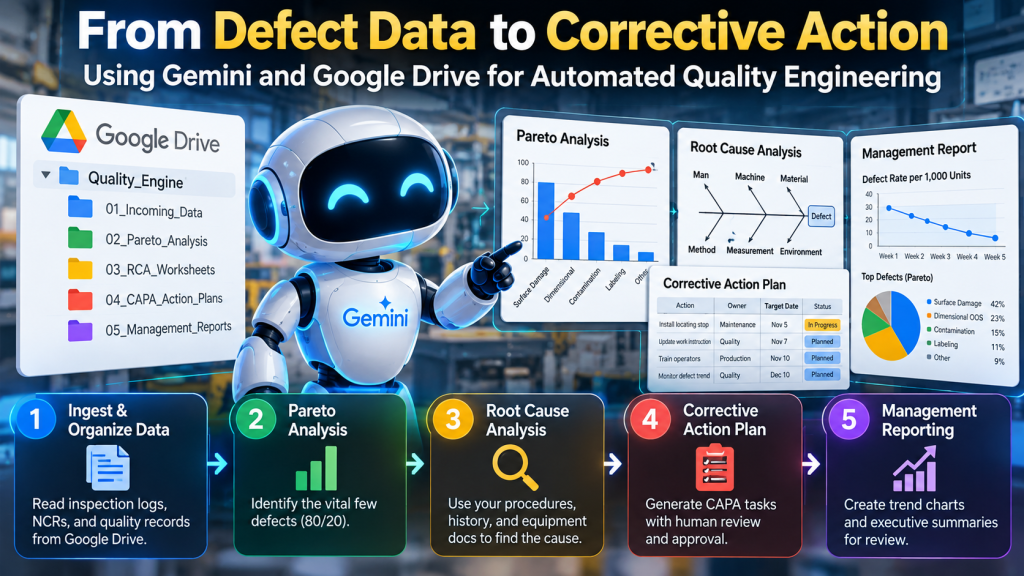
People usually treat Google Drive as a place to store quality records. With Gemini and Google Workspace automation, it can become more than that: the knowledge layer for an AI-assisted quality-engineering workflow. Imagine dropping inspection reports, defect logs, nonconformance records, procedures, equipment manuals, and historical corrective actions into a controlled Drive environment.
Instead of manually searching those files, consolidating defect counts, building a Pareto chart, launching a root-cause investigation, drafting corrective action, and assembling management-review charts, an AI workflow can perform much of that work automatically. The objective is not to let AI make uncontrolled quality decisions. The objective is to automate the repetitive analytical work so quality professionals can spend more time validating causes, approving corrective action, and improving the process.
A practical architecture looks like this:
Google Drive knowledge → defect aggregation → Pareto analysis → root-cause analysis → corrective action → management reporting
That moves Gemini beyond simple document search and toward automated quality engineering.
Why Google Drive Makes a Useful Quality-AI Foundation
Gemini in Google Drive can search and retrieve information using natural-language questions, synthesize information across multiple files, summarize folders, and return answers grounded in Drive content. Google also supports using specific files or folders as sources for Gemini analysis. Functionally, this gives organizations a built-in retrieval layer over the documents they already maintain in Workspace. The important word is grounded.
Instead of asking a general-purpose AI model, what usually causes this type of defect?
you can ask it to work from:
- your defect history,
- your inspection records,
- your work instructions,
- your machine manuals,
- your corrective-action history,
- your process specifications.
That changes the question from generic AI advice to: What does our own operational evidence say? Google Workspace Studio adds the workflow layer. Google describes Studio as a place to design and manage AI-powered agents and multi-step workflows across Workspace applications. Studio can also create Docs and Slides and run background flows using approved Workspace permissions. Together, Google Drive and Studio provide the foundation for a practical quality workflow.
Step 1: Build a Predictable Quality Folder Structure
AI works better when the operating environment is structured.
A simple Drive structure might look like this:
Quality_Engine/
│
├── 01_Incoming_Data/
│   ├── Inspection Logs
│   ├── NCRs
│   ├── Defect Reports
│   └── Maintenance Logs
├── 02_Pareto_Analysis/
├── 03_RCA_Worksheets/
├── 04_CAPA_Action_Plans/
└── 05_Management_Reports/
The folders serve different purposes.
01_Incoming_Datacontains source evidence.02_Pareto_Analysiscontains the structured defect analysis.03_RCA_Worksheetscontains root-cause investigations.04_CAPA_Action_Planscontains proposed and approved corrective actions.05_Management_Reportscontains trend charts, summaries, and management-review outputs.
The important principle is simple: Keep source evidence separate from AI-generated analysis and approved quality records. This makes the workflow easier to audit and reduces the risk of mistaking an AI-generated conclusion for an original source record.
Step 2: Standardize the Defect Data
The first agent acts as an ingestion and normalization agent.
Manufacturing defect data is rarely clean.
One shift may record:
- scratch,
- scratched surface,
- cosmetic scratch,
- surface damage.
Another operator may simply write:
- damaged.
If you count those descriptions literally, the Pareto analysis becomes unreliable.
The first agent therefore reads the incoming inspection records and normalizes defect descriptions into controlled categories such as:
- Surface Damage
- Dimensional Out-of-Spec
- Contamination
- Missing Component
- Incorrect Assembly
- Labeling Error
- Functional Failure
The agent should retain both values:
Original Defect Description
Normalized Defect Category
Do not overwrite the original observation. This creates traceability between the source record and the AI classification.
A useful normalized table might contain:
| Date | Part | Original Defect | Normalized Category | Quantity | Shift | Machine |
|---|---|---|---|---|---|---|
| Oct. 1 | A102 | scratched side | Surface Damage | 4 | 1 | M-04 |
| Oct. 1 | A102 | OD too large | Dimensional OOS | 2 | 1 | M-04 |
| Oct. 2 | A102 | cosmetic scratch | Surface Damage | 5 | 2 | M-04 |
For ambiguous descriptions, the agent should flag the record instead of inventing a classification.
Step 3: Let the Pareto Agent Find the Vital Few
Once the defect data is structured, the next agent performs the Pareto analysis.
The workflow is straightforward:
- Count defects by category.
- Calculate each category’s percentage of total defects.
- Sort categories from largest to smallest.
- Calculate cumulative percentage.
- Identify the dominant defect categories.
- Generate a Pareto chart.
- Select the priority defect for investigation.
For example:
| Defect | Count | % of Total | Cumulative % |
|---|---|---|---|
| Surface Damage | 147 | 42% | 42% |
| Dimensional OOS | 81 | 23% | 65% |
| Contamination | 53 | 15% | 80% |
| Labeling | 37 | 11% | 91% |
| Other | 31 | 9% | 100% |
The system does not need to interpret the 80/20 rule mechanically. Sometimes one defect dominates. Sometimes three categories make up the majority. The purpose of the Pareto is to focus investigation effort where the largest opportunity exists. The output should answer: Which defect should we investigate first? Gemini in Google Sheets can analyze spreadsheet data and generate charts and graphs, making Sheets a natural place for the Pareto and subsequent trend analysis.
Step 4: Launch Root-Cause Analysis on the Largest Defect
The next agent receives the Pareto result.
Suppose the top defect is:
Surface Damage — 42% of recorded defects
The Root Cause Analysis Agent should now focus on that problem rather than trying to investigate every defect at once. This is where Drive-based grounding becomes particularly valuable.
The agent can retrieve relevant information from:
- standard operating procedures,
- machine setup instructions,
- inspection procedures,
- maintenance history,
- prior NCRs,
- prior CAPAs,
- operator instructions,
- equipment manuals.
The agent can then organize the evidence using familiar quality methods.
5-Why Analysis
For example a 5-Why might be:
Problem: Parts are being scratched before final inspection.
Why 1: Why are parts scratched?
Parts contact the metal transfer guide.
Why 2: Why are they contacting the guide?
The guide alignment varies during changeover.
Why 3: Why does alignment vary?
Operators position the guide manually.
Why 4: Why is positioning manual?
There is no fixed locating feature.
Why 5: Why is there no fixed locating feature?
The original setup standard specifies position visually rather than dimensionally.
That may suggest a possible root cause, but AI should not automatically declare it proven.
The agent should distinguish among:
- fact from records,
- hypothesis,
- evidence needed,
- verified root cause.
That distinction is critical.
Fishbone Analysis
The agent can also populate an Ishikawa matrix or Fishbone:
| Category | Possible Cause |
|---|---|
| Man | Inconsistent setup method |
| Machine | Transfer guide movement |
| Material | Protective film variation |
| Method | No dimensional guide-setting standard |
| Measurement | Guide position not measured |
| Environment | Debris accumulation |
The output becomes a structured RCA worksheet in 03_RCA_Worksheets.
Step 5: Require Evidence Before Calling Something a Root Cause
One of the biggest risks in AI-assisted root cause analysis is confabulation. AI can easily generate plausible causes. Plausible does not mean true.
A useful rule is: AI may generate hypotheses automatically. Root cause requires evidence.
For example:
Hypothesis:
Guide misalignment causes the scratch.
Evidence might require:
- defect location comparison,
- guide-position measurement,
- reproduction test,
- maintenance inspection,
- before/after trial.
The agent should therefore produce something like:
| Potential Cause | Evidence | Status |
|---|---|---|
| Guide misalignment | Scratch location matches guide contact point | Likely |
| Material contamination | No contamination found | Rejected |
| Incorrect handling | No correlation by operator | Weak |
| Missing protective film | Film present on affected parts | Rejected |
This turns AI into an investigation assistant rather than an automated guess generator.
Step 6: Generate a Corrective Action Plan
Once the corrective-action agent has sufficient evidence of a root cause, it converts the investigation into an implementation plan.
A useful CAPA structure is:
| Action | Owner | Target Date | Verification |
|---|---|---|---|
| Add fixed locating stop to transfer guide | Maintenance | Nov. 5 | Guide repeatability ±0.5 mm |
| Revise setup work instruction | Quality Engineer | Nov. 7 | Controlled document released |
| Train operators | Production Supervisor | Nov. 10 | 100% affected operators trained |
| Monitor scratch defects | Quality | Dec. 10 | 30-day defect trend reviewed |
The agent can draft this automatically. But corrective-action approval should normally remain a human decision.
That creates a natural human-in-the-loop gate:
AI proposes corrective action
        ↓
Process Owner / Quality Lead reviews
        ↓
Approve / Revise / Reject
        ↓
Implementation
Human review belongs here because the proposed action may affect:
- equipment,
- process parameters,
- product requirements,
- validation,
- cost,
- customer commitments,
- regulatory obligations.
The AI should accelerate the analysis, not silently authorize process changes.
Step 7: Automatically Build the Management Trend Charts
Once the corrective action is implemented, the reporting agent should monitor whether the problem actually improves. The quality log already contains the required history.
The agent can create measures such as:
- defects per day,
- defects per week,
- defect rate per 1,000 units,
- scrap cost,
- top defect frequency,
- recurrence rate,
- CAPA completion status.
Gemini in Sheets can analyze spreadsheet data, identify trends, create formulas, and generate charts and graphs.
For management review, useful charts might include:
Top Defects Pareto
Shows where the quality losses are concentrated.
Defect Trend
Defect Rate per 1,000 Units
        │
        │  ●
        │   ●
        │    ●
        │      ●
        │        ●
        └────────────────
          Week 1 → Week 8
Corrective-Action Effectiveness
Compare:
Baseline period vs. Post-CAPA periodCAPA Status
- Open
- In Progress
- Completed
- Effectiveness Verified
- Overdue
Google Sheets can also create charts directly from Gemini prompts, although Google notes that generated charts may be created from a derived data tab rather than remaining dynamically linked to the original dataset, so that behavior should be checked when designing a recurring management-review process.
Step 8: Generate the Management Review Summary
The final agent converts the analysis into an executive summary.
For example:
Quality Issue: Surface Damage
Pareto Contribution: Largest defect category during the review period.
Primary Root Cause: Transfer-guide position was not controlled consistently during setup.
Corrective Action: Installed a fixed locating stop; revised the setup procedure; retrained operators.
Effectiveness Measure: Monitor defect rate for 30 days and compare against pre-action baseline.
Current Status: Corrective action implemented; effectiveness monitoring in progress.
Gemini can create Docs and Slides from Drive-based context, and Workspace Studio supports automated generation of editable Docs and presentations as part of agentic workflows.
That makes it possible to generate:
- a one-page quality summary,
- a management-review section,
- a CAPA report,
- or a management presentation.
One Agent or Several Agents?
You do not necessarily need five independent AI agents. That architecture can quickly become unnecessarily complicated. A simpler implementation might use one orchestrated workflow with five defined stages:
QUALITY ANALYSIS WORKFLOW
1. Normalize data
2. Pareto defects
3. Analyze root cause
4. Draft corrective action
5. Report trends
Each stage has:
- defined inputs,
- defined outputs,
- clear rules,
- a stop condition.
That is often easier to control than creating several autonomous agents communicating with each other. The key design principle isn’t the number of agents. It is the quality of the workflow boundaries.
A Practical Google Workspace Implementation
For organizations already using Google Workspace, a relatively low-code architecture could look like:
Google Drive
   ↓
Quality records and controlled documents
   ↓
Gemini / Drive retrieval
   ↓
Workspace Studio workflow
   ↓
Google Sheets analysis
   ↓
Google Docs RCA/CAPA
   ↓
Google Slides or Docs management report
Gemini in Drive can retrieve and synthesize information from Drive content, while Workspace Studio can orchestrate multi-step workflows and reusable skills across Workspace. For organizations that need more control, they can implement the same architecture using Python, APIs, or another orchestration framework. The workflow logic remains essentially the same.
What Should Remain Human-Controlled?
AI can automate much of the analytical workload, but humans should control several decisions.
Humans should normally approve:
- defect-category changes that affect official reporting,
- final root-cause determination,
- corrective-action authorization,
- process changes,
- specification changes,
- CAPA closure,
- effectiveness acceptance.
AI can prepare the evidence and recommendations. Management retains decision authority.
Start With One Defect Loop
Do not begin by trying to automate the entire quality-management system.
Start with one closed-loop use case:
Defect data
→ Pareto
→ top defect
→ RCA
→ corrective action
→ effectiveness trend
Choose an area where:
- data already exists,
- defect definitions are reasonably consistent,
- historical quality records are available,
- management cares about the result.
Run the workflow manually with Gemini first. Then standardize the prompts and folder structure. Then automate the repeatable steps. That progression is usually safer than starting with a fully autonomous agent.
From Document Search to Automated Quality Engineering
The biggest opportunity is not simply asking Gemini questions about quality documents. It is connecting those documents to an operating workflow.
Instead of: Find our old CAPA about scratches.
the system can begin asking: What defects are occurring most often?
then: Which one should we investigate first?
then: What does our own process evidence suggest about possible causes?
then: What corrective action should we consider?
and finally: Did the corrective action actually reduce the problem?
That is the transition from AI-powered document search to AI-assisted quality engineering. The technology is becoming capable of supporting that workflow inside tools many organizations already use. Gemini in Drive can retrieve and synthesize Workspace information; Workspace Studio can orchestrate agentic processes; Sheets can perform analysis and create charts; Docs and Slides can generate the resulting reports. The real work is designing the workflow so AI handles repetitive analysis while evidence, approval, and accountability stay under control. That is where the business value begins. If your organization uses Microsoft 365, see our guide to Copilot and SharePoint for AI quality engineering.


